Evil Crawling Things Controls and Settings
Find the keyboard controls and interaction prompts for Evil Crawling Things, then adjust sound, camera effects, sprinting, and round participation in Settings.
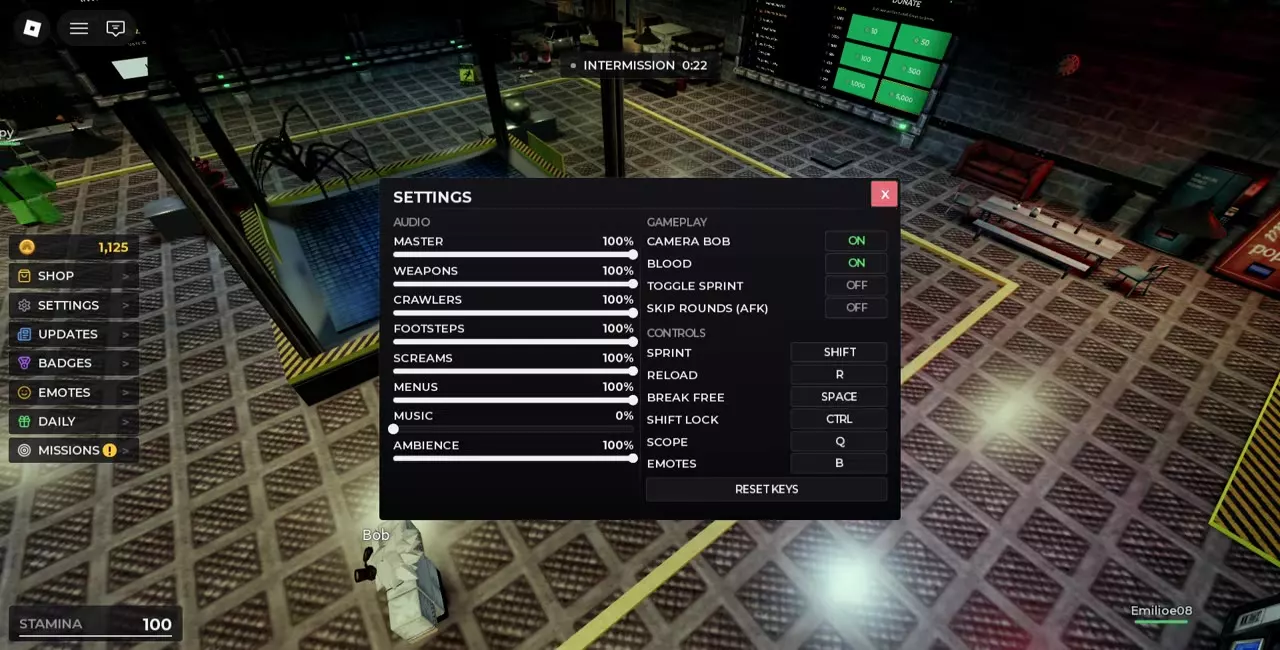
Open SETTINGS on the left side of the lobby to check keyboard bindings and use Reset Keys. Set Music to 0% under AUDIO to mute it. Under GAMEPLAY, adjust Camera Bob, Blood, Toggle Sprint, and Skip Rounds (AFK). Turn Skip Rounds on to sit out rounds and off to join again.
Open the in-game settings
Select SETTINGS on the left side of the lobby. The panel contains AUDIO sliders, GAMEPLAY switches, and CONTROLS bindings.
For Roblox display and graphics options, open the Roblox menu and select its separate Settings tab.
Keyboard bindings and controller prompts
Check CONTROLS in the game’s SETTINGS panel for your keyboard bindings. Select Reset Keys there to restore them.
| Action | Keyboard | Controller |
|---|---|---|
| Sprint | Shift | |
| Reload | R | |
| Break free | Space | A |
| Shift Lock | Ctrl | |
| Scope | Q | |
| Emotes | B | |
| Door open or close | E | X |
| Interact with Bob | E | |
| Man Firebase machine gun | E |
For doors, approach the control panel and use the input shown beside Open / Close. Use E at the prompt to interact with Bob or man the mounted machine gun in Firebase.
Mute music and adjust sound categories
Open SETTINGS → AUDIO and move the Music slider to 0% to mute music. You can leave the other sound categories at their existing levels.
Master controls overall game volume. The individual sliders are Weapons, Crawlers, Footsteps, Screams, Menus, Music, and Ambience. Adjust the category you want, then close SETTINGS to return to the game.
Camera Bob, Blood and Toggle Sprint
Under SETTINGS → GAMEPLAY, turn Camera Bob off to remove camera bobbing and Blood off to hide blood effects. Each has its own switch.
Turn Toggle Sprint on to switch sprinting on and off instead of holding the sprint key. Keyboard Shift Lock is a separate control bound to Ctrl.
For display options, open the Roblox menu and choose Settings. It contains Safe Zone, Fullscreen, Background Transparency, Text Size, Performance Stats, Graphics Mode, and Graphics Quality.
Skip Rounds with AFK mode
Open SETTINGS → GAMEPLAY and turn Skip Rounds (AFK) on to sit out rounds. Turn the same switch off when you want to participate again.
Custom tags and gameplay actions
If you own the Custom Tag pass, open Settings to set your tag and choose its color. The tag displays in chat and above your character. See Game Passes for pass prices and benefits.
- Follow the survival guide for escaping a Crawler’s grab and returning to safety.
- See equipment slots and the firing range for aiming, reloading, and practicing with weapons.
- Open the emotes guide for buying emotes and playing them from the wheel.